الانتقال إلى المحتوى الرئيسي
Uptime Kuma hosting

Uptime Kuma, hosted away from your kit.

A monitor that runs on the machine it is watching tells you nothing when that machine dies. This one runs on our UK infrastructure, preinstalled, from £1.99 a month.

PreinstalledLog in and start adding monitors
Instant alertsSlack, Discord, email, webhooks
NVMe SSDHistory that loads quickly
DDoS filteredSame network as everything else
Updates handledPatching and SSL are ours
UK hostedOur own building and hardware
What it watches

Five check types, and one that matters more than the rest

HTTP, TCP, ping and DNS cover most of what people need. The one worth setting up properly is HTTP with keyword matching: a server can return a perfectly healthy 200 and still be serving a blank page or a database error.

  • HTTP and HTTPS
  • HTTP with keyword matching
  • TCP port
  • Ping
  • DNS
  • Websites and services

    Uptime and response time for anything with an address, so you find out before your customers do that the site has stopped answering.

  • Server health

    Watch the ports and services on a machine, so a stopped process or a full disk shows up as an alert rather than as a support ticket.

  • APIs and custom apps

    Check that an endpoint still returns what it should, not merely that something answered on the port.

  • IoT and home networks

    Devices, routers and connections that nobody notices have failed until something else stops working because of it.

  • Business-critical services

    Checkout flows, payment endpoints and booking systems, where an hour of quiet downtime is measured in lost revenue.

  • Game servers

    A TCP or ping check on your server ports tells you a world has dropped before your community starts asking in Discord.

Why hosted, not self-hosted

A monitor inside the outage is not a monitor

This is the whole argument for paying two pounds a month rather than running it on the box under your desk. When your own site, connection or power goes down, so does the instance that was supposed to tell you about it.

Self-hosted, same site your site, offline web server down database down Uptime Kuma also down no alert sent Hosted with us, outside it your site, offline web server down database down checks in Uptime Kuma on our UK network alert sent Slack, Discord, email

Scroll the diagram sideways to compare both topologies

Illustration of the two topologies. The only monitor worth having is one that survives whatever it is monitoring. That is the entire reason this product exists.
  1. 01

    It survives your outage

    The instance runs on professional-grade infrastructure separate from yours, so it keeps checking when your own hardware, connection or power goes down.

  2. 02

    Nothing to set up

    No Docker, no reverse proxy, no certificate to renew. The software is installed and running when you log in for the first time.

  3. 03

    Reachable from anywhere

    Its own address rather than a port forward on your router, so the dashboard opens on a phone without a VPN in the way.

The dashboard

Everything you watch, on one screen

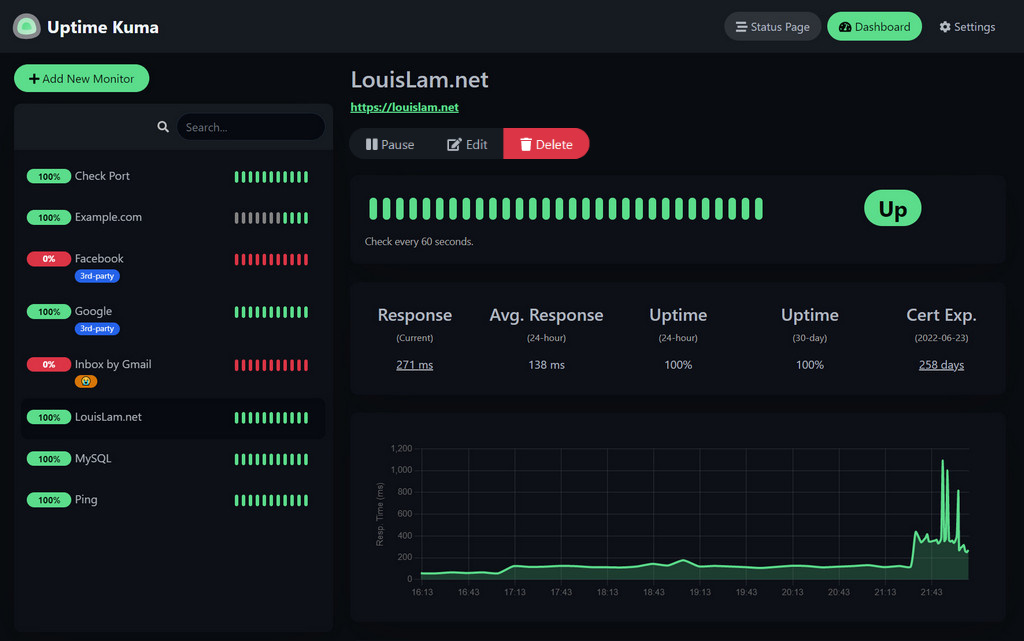
Monitors down the side, uptime and response history in the middle, and a status page you can share with your own users if you want to.

The Uptime Kuma dashboard, showing a list of monitors with their uptime percentages and response time history.
  • Uptime and latency history

    Response times plotted over time, so a service that is getting slower shows up before it fails outright.

  • Notifications where you already are

    Slack, Discord, email and webhooks among a long list, configured per monitor rather than globally.

  • Check intervals you control

    Set how often each monitor runs and how many failures count as down, so a flaky endpoint does not page you constantly.

  • Keyword checks

    Confirm the page contains what it should, not just that it returned a 200. This is what catches a blank page or a database error.

  • Shareable status pages

    Publish a subset of your monitors so your own customers can check before they raise a ticket.

The plan

One instance, £1.99 a month

There is one plan because there is one thing to buy. The comparison beside it is what you are actually paying for.

The practical difference between running it yourself and running it here.
  Self-hosted at home Hosted with us
Setup You install and configure it Already running when you log in
If your own kit dies The monitor dies with it It keeps checking and alerts you
SSL certificates Yours to issue and renew Handled for you
Patching and updates Yours to remember Handled for you
Remote access Port forwarding or a VPN Its own address, reachable anywhere
Cost Your hardware and your time £1.99 per month
Uptime Kuma hosting

Monitoring questions

Uptime Kuma is a self-hosted monitoring tool. It checks your websites, APIs, servers and devices on a schedule, records the response time, and alerts you the moment something stops answering. It is open source, and this plan is that software already installed and running for you.

Watching uptime and response times for websites and services, tracking server health before it becomes downtime, keeping API endpoints honest, checking IoT devices and home network stability, and making sure business-critical services such as an online shop are still taking orders.

Mainly because a monitor that lives on the same machine as the thing it watches is not a monitor. Hosting it here means it keeps checking when your own hardware, your connection or your power goes down. It also means no setup, no patching and no certificate renewals for you.

HTTP and HTTPS, HTTP with keyword matching so a 200 response with the wrong content still alerts, TCP ports, ping and DNS. That covers most of what people actually need to watch.

Yes. Uptime Kuma supports a long list of notification channels including Slack, Discord, email and webhooks, so alerts land wherever your team already is.

We handle the SSL certificate, the firewall rules and the server patching, which are the three things a self-hosted instance usually falls behind on. The instance sits on our DDoS-filtered UK network.

No. Updates and system maintenance are handled for you, so the instance does not quietly drift several versions behind while it is busy watching everything else.

Yes. It is a hosted instance with its own address, so there is no port forwarding, no dynamic DNS and no VPN needed to see your dashboard from a phone.

On our own hardware in our own UK data centre. You can check the network yourself on our Looking Glass before you buy.

Yes, and plenty of people do exactly that. The instance does not care whose network the target is on, which is rather the point of hosting the monitor away from what it is monitoring.

Put your monitoring somewhere it will survive

Order the instance, log in, and start adding monitors. If you would rather ask something first, our team is on Discord.

  • Preinstalled and patched
  • Instant alerts
  • NVMe SSD storage
  • UK infrastructure