
Can You Host on CGNAT or Mobile Internet? Here's What Works
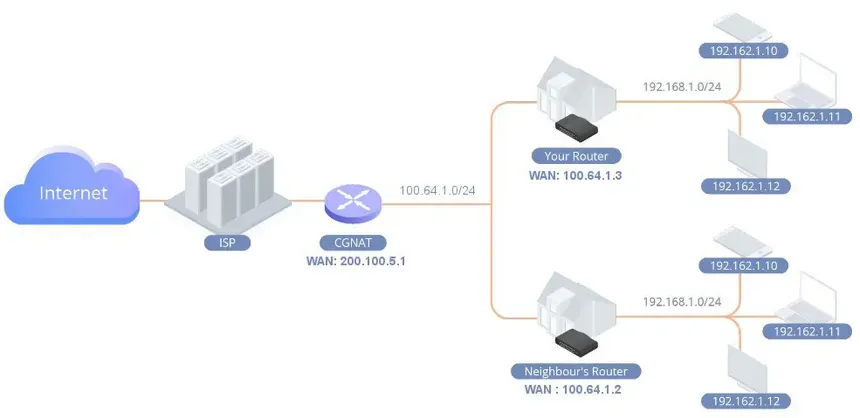
Hosting a game server or self-hosted application from home is appealing, but if your ISP uses CGNAT (Carrier-Grade NAT) or you're relying on mobile internet, you might run into serious limitations. This guide breaks down what's possible, what's not, and workarounds to get online successfully.
What is CGNAT?
CGNAT is a networking method ISPs use to conserve IPv4 addresses. Instead of assigning you a true public IP address, you're placed behind a shared external IP with multiple other users. This means:
- You can't forward ports
- Your router isn't reachable directly from the internet
- Self-hosting from home becomes nearly impossible without help
Many mobile internet providers (4G/5G) and some budget ISPs use CGNAT.
Why Does CGNAT Break Hosting?
To host a server, devices on the internet need to connect to your public IP and specific port. CGNAT prevents that by blocking all unsolicited inbound traffic—so your port forwarding rules are ignored.
Symptoms of CGNAT include:
- Port scanners always show closed
- Friends can't connect to your server
- You see a private IP (100.x.x.x, 10.x.x.x) on your router WAN interface
Workarounds That DO Work
1. Use a VPS as a Tunnel (Reverse Proxy)
Rent a small VPS with a public IP. You can:
- Use WireGuard or OpenVPN to forward game traffic
This method gives your home server a "public face."
2. ZeroTier or Tailscale (Mesh Networking)
These tools create a private VPN-like network where devices can see each other:
- Great for personal, private use (LAN-style)
- Doesn’t require port forwarding
- Not suitable for public game hosting (players can’t join without the mesh client)
3. Remote Hosting Providers (Recommended)
If you're serious about public hosting, skip the workarounds and use a proper VPS or game server host. You get:
- True public IP
- DDoS protection
- Low-latency bandwidth
- No port forwarding headaches
EUGameHost offers this out of the box with full config control.
Mobile Internet Hosting
Most mobile networks do not provide public IPv4 addresses. Even with excellent speeds, CGNAT is still a bottleneck.
Tips:
- Use mobile only for outbound connections (e.g. gaming, not hosting)
- Check with your provider if they offer public IP add-ons
- Avoid hotspot hosting unless for quick testing
Summary
You can host from CGNAT or mobile connections—but only with workarounds like VPN tunnels or remote VPS setups. For reliability and proper access, we always recommend using a hosting provider that gives you a public IP, DDoS protection, and full server control.