
Understanding MTU, MSS, and Fragmentation in Game Traffic
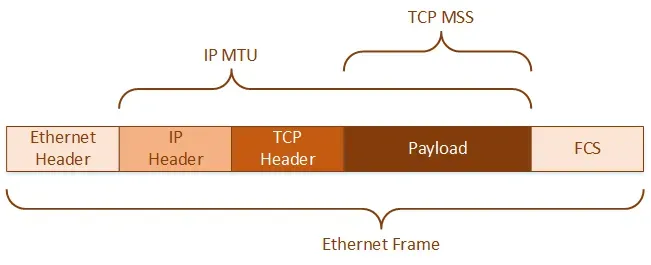
Most game server owners hear about "ping" and "packet loss," but far fewer understand the underlying mechanics of MTU (Maximum Transmission Unit), MSS (Maximum Segment Size), and packet fragmentation. These networking concepts directly impact performance, lag spikes, and player stability.
This guide breaks them down in plain language and explains how they affect your game server.
What Is MTU?
MTU (Maximum Transmission Unit) is the largest size (in bytes) of a packet that can be sent in one piece over a network. If a packet is larger than the MTU of any link in its path, it must be fragmented or dropped.
- Most networks use a standard MTU of 1500 bytes.
- VPNs or tunnels like GRE or WireGuard often reduce this (e.g., to 1400–1420 bytes).
Why it matters:
- A too-large MTU can cause packet fragmentation, leading to performance issues.
- A too-small MTU can waste bandwidth due to excessive overhead.
What Is MSS?
MSS (Maximum Segment Size) is the largest segment of data that TCP will send in a single packet. It excludes IP and TCP headers and is usually calculated as:
MSS = MTU - 40
So for an MTU of 1500, MSS is 1460 bytes.
Why it matters:
- Some firewalls or NAT devices improperly handle large segments.
- MSS clamping is often used on routers or VPN gateways to avoid issues.
What Is Fragmentation?
Fragmentation occurs when packets exceed the MTU and are broken into smaller pieces to pass through a network. This can lead to:
- Increased latency (due to packet reassembly)
- Higher CPU usage on clients or servers
- Dropped packets if fragments are lost or blocked
Many modern networks block fragmented packets altogether, especially at the firewall level.
How This Affects Game Servers
Game traffic often relies on fast, low-latency UDP packets. When these packets are fragmented or delayed:
- Players may experience rubber-banding or delayed hits
- Voice data can stutter (e.g., proximity chat)
- Server-to-server communication may drop (cross-server chat, cluster data)
If you're using tunnels (e.g., GRE, WireGuard, VPNs), reduce your MTU accordingly and clamp MSS to 1360–1400.
How to Check and Fix MTU Problems
1. Use Ping to Discover Path MTU
Run this in a terminal or command prompt:
ping your-server-ip -f -l 1472  # Windows
ping -M do -s 1472 your-server-ip  # Linux
Reduce the packet size until you find the highest that doesn’t fragment. Add 28 to get the real MTU.
2. Clamp MSS on VPNs or Routers
On Linux:
iptables -t mangle -A FORWARD -p tcp --tcp-flags SYN,RST SYN -j TCPMSS --clamp-mss-to-pmtu3. Set MTU Manually on Interfaces
Example (Linux):
ip link set dev eth0 mtu 1400Summary
MTU, MSS, and fragmentation may sound like deep networking jargon — but they have real consequences for game server performance. Incorrect values or ignored defaults can cause lag, packet loss, and unreliable connectivity.