
Intro to Cron Jobs: Automating Tasks on Linux
Cron jobs are one of the most powerful features in Linux for automating repetitive tasks. Whether you need to back up files, restart services, clean logs, or run health checks, cron makes it easy to schedule commands at fixed times or intervals.
What Is a Cron Job?
A cron job is a scheduled task that runs automatically at specified times or dates. Cron uses a daemon called crond that continuously runs in the background, checking configuration files for tasks to execute.
Jobs are usually defined in a user-specific crontab (cron table), which stores the timing and command to run.
Why Use Cron Jobs?
- Automation: Run scripts and commands without manual input
- Consistency: Ensure tasks happen at the same time every day/week/month
- System Health: Schedule updates, reboots, log rotation, or system checks
- Backups: Automatically copy files or databases to external storage
Cron Timing Syntax
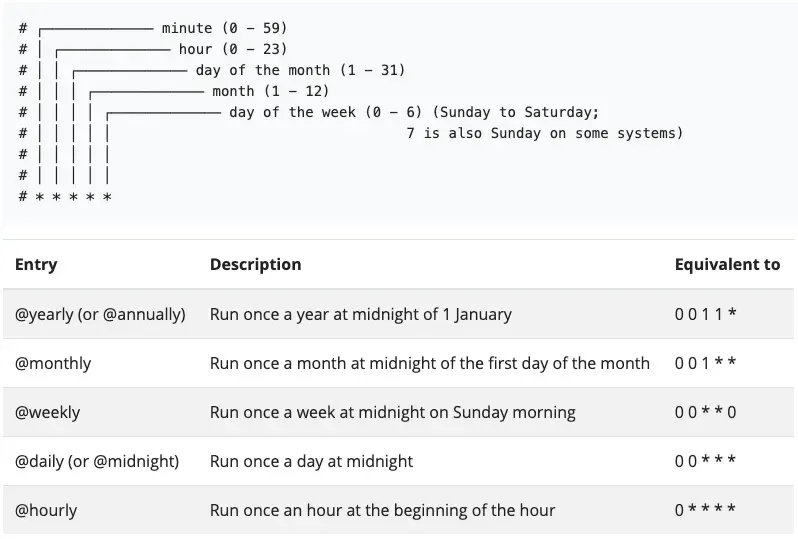
Each line in a crontab follows this format:
* * * * * command_to_run
- - - - -
| | | | |
| | | | +----- Day of week (0 - 7) (Sunday is 0 or 7)
| | | +------- Month (1 - 12)
| | +--------- Day of month (1 - 31)
| +----------- Hour (0 - 23)
+------------- Minute (0 - 59)
Examples
0 3 * * * /home/user/backup.sh      # Run backup every day at 3:00 AM
*/10 * * * * /usr/bin/uptime       # Run every 10 minutes
0 */6 * * * /root/check.sh         # Run every 6 hours
How to Add a Cron Job
To edit the current user's crontab:
crontab -eTo view your current cron jobs:
crontab -lTo remove all cron jobs:
crontab -rGood Practices
- Use full paths for commands (e.g.
/usr/bin/phpinstead ofphp) - Test your script manually before scheduling
- Avoid using cron for tasks that run more often than once per minute
Redirect output to log files for troubleshooting
* * * * * /path/to/script.sh >> /var/log/script.log 2>&1Alternative: System-wide Cron
You can also create job files in /etc/cron.d/ or use directories like:
/etc/cron.hourly//etc/cron.daily//etc/cron.weekly/
Drop shell scripts in those folders and the system will run them automatically.
Summary
Cron jobs are a fundamental part of Linux system administration. They allow you to automate repetitive or time-sensitive tasks with precision and reliability. Once set up, they silently handle background work and keep your server running smoothly.