
What Is Swap Space and Should You Use It on Your VPS?
Swap space is an essential but often overlooked part of Linux server configuration. It acts as an overflow for your system's RAM, helping keep your VPS stable when memory usage spikes. But should you use swap on a VPS—and if so, how much?
What Is Swap Space?
Swap space is a portion of your disk that acts as virtual memory. When your system's physical RAM is full, inactive pages of memory can be moved to the swap area to free up RAM for other active processes. This prevents your server from crashing or killing important tasks.
Swap can exist as:
- A dedicated swap partition (common on full OS installs)
- A swap file (more common on VPS setups)
Pros of Enabling Swap on a VPS
- Prevents Out-of-Memory Crashes: Essential if your application occasionally exceeds physical RAM.
- Improves Stability: Lets background or idle processes sit in swap while critical apps stay in RAM.
- Allows Overcommit: Helpful for servers running bursty applications (like web servers or game servers).
Cons of Swap Space on a VPS
- Slower Than RAM: Swap is much slower than physical memory, especially on HDDs.
- Can Mask Poor Memory Usage: Apps with memory leaks may seem stable until the system becomes sluggish.
- May Wear Out SSDs: Excessive swapping on SSD-based VPSs can reduce lifespan over time.
Should You Use Swap?
In most VPS scenarios — yes, but keep it small and strategic.
Use Swap If:
- You have 1–2GB of RAM or less
- You run apps with unpredictable memory usage
- You want to avoid crashes from memory spikes
Avoid Swap If:
- Your app needs consistent high-speed memory access
- You're running a database or low-latency app and already have enough RAM
How Much Swap Should You Use?
A safe rule of thumb:
- 1–2 GB of RAM → 1–2 GB of swap
- 4 GB+ RAM → 512 MB – 1 GB of swap (for emergencies only)
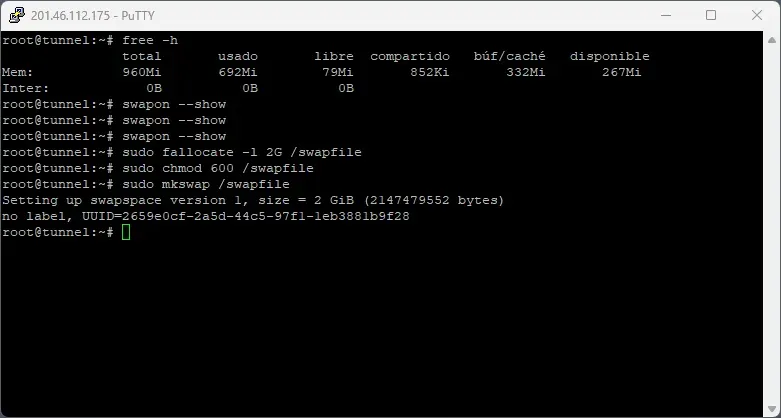
How to Set Up Swap (Ubuntu/Debian)
sudo fallocate -l 1G /swapfile
sudo chmod 600 /swapfile
sudo mkswap /swapfile
sudo swapon /swapfile

# Make it permanent
echo '/swapfile none swap sw 0 0' | sudo tee -a /etc/fstab
To view swap status:
swapon --show
free -h
Summary
Swap space is a safety net for your VPS—not a performance booster. A small swap file can save your server from crashing during memory spikes, especially on lower-memory instances. Just don't rely on it as a substitute for RAM.