
Pre-Generating and Trimming Worlds in Minecraft – 2025 Guide
If you're running a Minecraft server, especially one with a large world or heavy player activity, pre-generating and trimming chunks can significantly improve performance. This guide will walk you through both processes for Spigot/Bukkit and Forge/modded servers, using plugins like WorldBorder and mods like Chunk-Pregenerator.
🧱 What is Chunk Pre-Generation?
By default, Minecraft generates world chunks as players explore new areas. Pre-generating means generating these chunks in advance, so the server doesn’t have to work as hard during gameplay. This reduces lag and provides smoother performance during peak hours.
⚠️ Warning: Chunk pre-generation is CPU and RAM intensive. Run it when no other players are online.
🧹 What is Chunk Trimming?
Chunk trimming removes any world data outside your chosen world border. This helps reduce:
- Unused region files
- Server storage usage
- Backup sizes
Trimming won’t delete anything within your set border—it only clears chunks you’ll never need.
✅ Requirements for Spigot or Bukkit Servers
To follow this method, you’ll need:
- A Spigot or Bukkit-based server
- The latest version of the WorldBorder plugin
- At least 2 GB RAM for larger pre-gen sizes
🔧 How to Pre-Generate Chunks (Spigot/Bukkit)
- Install the WorldBorder plugin
- Restart the server
- Stand at your spawn or centre location (usually 0,0)
- Set the border:
/wb set <radius>for a square/wb set <radiusX> <radiusZ>for a rectangle
- Whitelist yourself and ensure you're the only one online:
/whitelist on
- Start generation:
/wb fill/wb fill confirm
You’ll see progress updates like this:

- Cancel at any time:
/wb fill cancel- or pause with
/wb fill pause
- Optional: Trim the world to your border:
/wb trim- Only run this when you’re the only player online
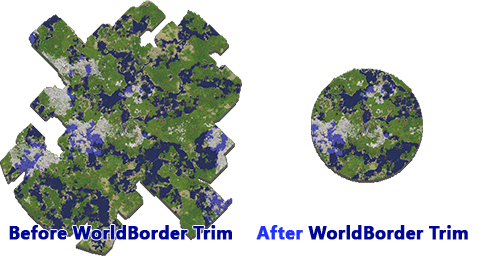
📸 Before and After Chunk Trimming
Here’s what trimming looks like visually:
Before and After Pre-Gen (WorldBorder):

Chunk Trim Comparison:
🚀 Power Up Your Minecraft Server Today
Get blazing-fast Minecraft hosting from just £1 per GB of RAM.
Perfect for modpacks, chunk pre-gen, and lag-free gameplay.
✅ NVMe Storage
✅ DDoS Protection
✅ Full Mod Support
✅ Instant Setup
🔥 For Modded Servers (Forge)
Running a Forge server with terrain mods? Chunk pre-generation is even more valuable due to the increased worldgen complexity. You’ll use the Chunk-Pregenerator mod.
Requirements
- Server must be offline
- A manual backup is strongly recommended
- Compatible Forge version: 1.4.7 to 1.16
- At least 2 GB RAM
- Download the correct version of Chunk-Pregenerator
⚙️ How to Pre-Generate Chunks (Modded/Forge)
- Install Chunk-Pregenerator on your server
- Restart your server
- Stand at your desired spawn/centre location
- Run the command:bashCopyEdit/pregen gen startradius SQUARE 0 0 100
- Replace
100with your desired radius - Use
CIRCLEinstead ofSQUAREto change the shape
- Replace
- The mod will show chunk-by-chunk progress
- On completion, it will give a full summary including total chunks generated and any failures
- For more commands and usage:
Chunk-Pregenerator Command Documentation
🎯 Final Tips
- Always pre-gen when no players are online.
- Trim after pre-gen to keep your world clean.
- Don’t attempt this on a weak host—allocate enough memory and CPU threads.
- Back up your world before trimming or pre-generating.