













Essential
Dev & test servers, small whitelisted RP
£5.99/mo
£5.99£3.00/mo
Save £35.88/yr
- 2 vCPU Intel Xeon
- 4 GB RAM DDR4 ECC
- 60 GB Enterprise NVMe
- 5 Gbps Unmetered
 FiveM VPS Hosting
Your FiveM server,
full root in 60 seconds
Backed by our 30 Tbps anycast DDoS network, free on every plan.
Host your own FiveM roleplay server on a UK VPS with full root SSH access, txAdmin ready out of the box and 30Tbps DDoS protection, all on NVMe Gen 4 storage in our own UK data centre. Run ESX, QBCore, Qbox or any custom framework. No contracts, cancel anytime, with a 48-hour money-back guarantee.





Every FiveM VPS runs on dedicated vCores with NVMe Gen 4 storage, 30Tbps DDoS protection and full root access, txAdmin ready and hosted in the UK, live in under 60 seconds. Save 50% when you pay annually.
Dev & test servers, small whitelisted RP
Up to ~32 players, ESX & QBCore ready
32 to 64 players, heavy scripts & custom frameworks
64+ players, OneSync, Qbox & large script libraries
Multiple servers, staging & production splits
Large RP networks & heavy custom builds
From a fresh Ubuntu image to players connecting takes about fifteen minutes. These are the steps; the full commands are in the FiveM documentation and our Discord.
Deploy Ubuntu 22.04 or 24.04, connect over SSH, update the packages and create a fivem user. Open 30120 TCP and UDP in ufw, plus 40120 TCP if you will reach txAdmin from a browser.
Download the latest Linux artifact from the Cfx.re artifacts page, extract it, and run run.sh once. txAdmin ships inside FXServer and prints a PIN on first start; open it in your browser on port 40120 to finish setup.
Create a free server key at the Cfx.re Keymaster for your VPS IP, paste it into txAdmin, then pick a recipe (ESX, QBCore or a vanilla base) or drop in your own resources. Start the server and it appears in the FiveM server list.
Every VPS ships with VirtFusion: reboot, reinstall, monitor and manage your server in seconds, no support ticket required.
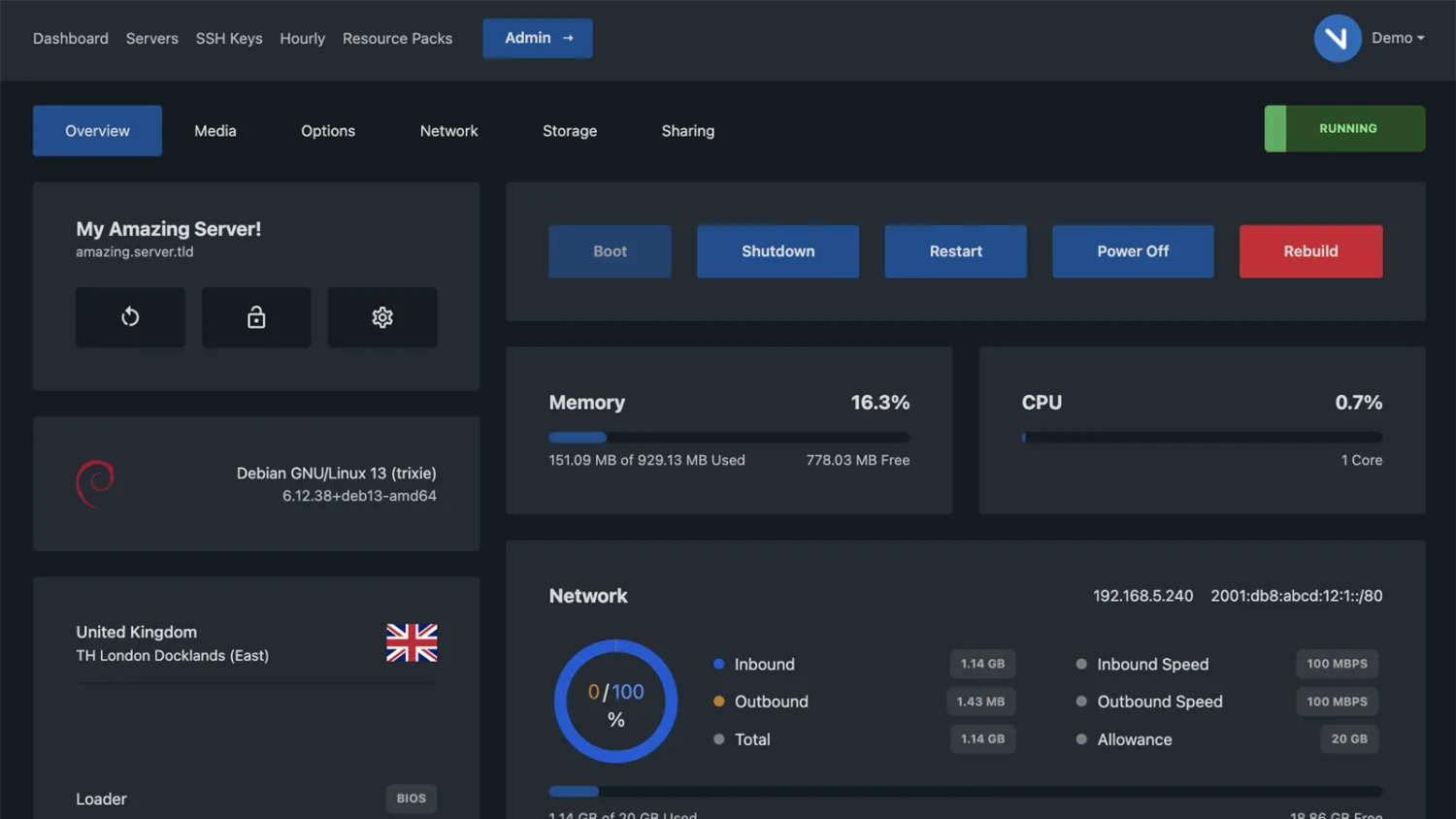
Boot, restart, power off or rebuild your server instantly, no waiting on support.
Real-time CPU, memory, network and storage usage at a glance.
Redeploy Ubuntu, Debian, Windows and more from the template library in a click.
Full out-of-band console access whenever you need to get hands-on.
Manage SSH keys, IPs and rDNS yourself, right from the dashboard.
A dev server next to the live one is the most common reason to run two. Root access makes it a matter of ports and folders.
Keep each server in its own folder with its own server.cfg, resources and txAdmin profile, so an update or a broken script on one never touches the other.
Give the second server 30121 for game traffic and 40121 for txAdmin, open both in the firewall, and each one needs its own licence key from the Keymaster.
Budget 4 GB or more per populated server plus headroom. The Advanced plan runs a dev and a small live server; Growth or Performance for two busy roleplay servers.
Your FiveM server sits on our own private fibre runs feeding a global anycast network, so routes stay short, attacks are scrubbed at the nearest edge, and game queries are answered locally instead of from origin.
 UK-owned facility
Your VPS doesn’t sit in a reseller’s rack. We own the building, the racks and the hardware it runs on, so there’s no middleman between you and the metal.
No reseller margin stacked on top. You pay for hardware we run ourselves, not someone else’s markup.
Our engineers are on-site with physical access to the hardware, so problems get hands-on attention in minutes, not days.
We own the full stack: power, network and hardware. That means we can tune, scale and secure your VPS without waiting on a third party.
Both run on the same UK hardware. The difference is who looks after the server.
You want root, a custom build of FXServer, several servers on one machine, extra services like a database or a website next to the game, or full control of txAdmin.
You want the server live now with txAdmin, updates and backups handled for you from a control panel. See our managed FiveM server hosting.
Same 30 Tbps DDoS protection, same low UK latency, same 48-hour money-back guarantee. Start managed and move to a VPS later if the community outgrows it.
Trustpilot'ta 500+ sunucu sahibi tarafından 4.8 / 5 puan aldık.
Bir Rust sunucusu sipariş ettim ve daha Discord'u kurmayı bitirmeden online oldu. Performans son derece sağlam ve panel gerçekten kullanması kolay.
Gece 2'de bir mod çakışması yaşadım ve gerçek bir insan canlı sohbette dakikalar içinde çözdü. Bot yok, ticket yanıtı için günlerce bekleme yok. Harika.
Çok daha büyük bir sağlayıcıdan geçtim ve gözle görülür şekilde daha iyi performans için daha az ödüyorum. Dolu bir Minecraft sunucusuyla bile hiç lag yok.
Aylardır sıfır kesinti ile bir topluluk ARK kümesi çalıştırıyorum: oyunculara hiç dokunmayan birkaç DDoS denemesine rağmen.
İlk kez bir sunucu çalıştırıyordum ve tek tıkla kurulumlar bunu çocuk oyuncağı haline getirdi. Seçilecek bir sürü oyun var ve aralarında geçiş yapmak çok kolay.
Barındırmak istediğin oyunu seç, sonra bizi sına: taahhüt yok, istediğin zaman iptal.
Yes. txAdmin is the official FiveM server management panel and is ready to use on every VPS plan. It runs alongside FXServer and gives you a browser-based interface for monitoring, player management, restarts and recipe-based deployments.
Yes. Every FiveM VPS comes with full root via SSH on Linux, or Administrator access on Windows. Install FXServer, txAdmin, your framework and any resources exactly how you like.
Most deployments complete within 60 seconds of payment. You receive your SSH credentials immediately and can log straight in to set up FXServer and txAdmin.
Yes. All major FiveM frameworks are fully supported. We include MariaDB 10.5+ support, which ESX, QBCore and Qbox all require. Deploy frameworks directly via txAdmin recipes or install manually with full root access.
Yes. OneSync is handled by Cfx.re, not your host, so it just needs FXServer running correctly. Free OneSync works up to 48 players. For higher slot counts a Cfx.re Portal subscription is required.
Yes. A free Cfx.re registration key is required to run FXServer. You create it in the Cfx.re Keymaster after linking your account. It is a quick one-time step and our setup guide walks you through it.
It depends on your script load, database queries and OneSync config more than raw hardware. As a rough guide, Essential (2 cores / 4GB) handles small whitelisted servers, Advanced (4 cores / 8GB) suits up to ~32 players, and Growth (8 cores / 16GB) handles 32 to 64 players with heavy scripts.
FiveM uses port 30120 TCP/UDP for game traffic and port 40120 TCP for txAdmin. Both are open by default on our VPS plans, and you can manage additional firewall rules through the control panel.
Yes. Every FiveM VPS includes 30Tbps DDoS protection at no extra cost, with game-layer filtering for FiveM-specific traffic patterns. No activation required, it is always on.
Yes. Enterprise NVMe storage and dedicated vCores are built for resource-heavy servers with large vehicle packs, custom MLOs and high script counts. Upgrade your plan instantly as your library grows.
In our own UK data centre, with low latency to London and full GDPR-compliant UK data residency, keeping your FiveM players connected with minimal ping.
Yes. We can help transfer your FXServer configuration, resources and database to your new VPS. Contact our support team before ordering to discuss your setup and we will handle the migration.
Yes. Scale CPU, RAM and storage at any time without rebuilding, with minimal downtime, so you never have to migrate hosts as your community grows.
Yes. A 48-hour money-back guarantee on all new FiveM VPS orders. If you are not happy, contact support within 48 hours for a full refund.
You do not need to port forward on a VPS, because the server has a public IP address already. You only need to open the ports in the server firewall: ufw allow 30120/tcp, ufw allow 30120/udp and, for txAdmin, ufw allow 40120/tcp. Players connect to the VPS IP on 30120.
