Nano
Personal cloud storage tests
£0.64/month
Was £0.99/mo
From £0.50/mo on annual billing.
- 1 vCPU
- 512MB RAM
- 5GB NVMe SSD
- 100Mbps port
Your files are not in the air. They live on real drives in real data centres, and the country they sit in decides which laws apply to them.
When you ask where cloud storage is stored, the honest answer is: in racks of servers, inside secure data centres, using layers of storage systems and networking. Here is what that actually means.
Cloud storage is stored in specialist data centres, secure buildings with power, cooling, fire suppression and physical security. Your cloud files sit on servers inside these facilities, not floating on the internet.
Inside each data centre are racks of physical servers. These hold the disks and NVMe drives that actually store your cloud data, plus CPUs and RAM that handle requests when you upload, download or sync files.
At the lowest level, your cloud storage lives on spinning hard drives or flash based NVMe SSDs. The software of the provider spreads your data across many disks and servers for durability and performance.
To prevent data loss, cloud storage systems replicate your files across multiple drives and often multiple servers or racks. If one disk dies, your data is still available from the replicas.
Large cloud providers group data centres into regions and availability zones. When you choose a region, for example UK or EU, your cloud storage is stored in data centres in that geography.
Modern cloud storage is usually encrypted at rest (on disk) and in transit (over the network). Keys and access control determine who can actually read the data stored on those physical drives.
This guide breaks down exactly where cloud storage is stored, how providers decide which country your data sits in, and how UK based cloud servers and VPS give you more control over where your data actually lives.
When you upload a file to the cloud, it is written to a physical disk inside a data centre. That data centre might be in your country, a neighbouring country, or on a completely different continent, depending on the provider and the settings you choose.
A typical cloud storage stack looks like this:
Your cloud storage is stored on these disks as blocks of data, with metadata telling the system how to rebuild your file when you click download or sync from another device.
Most large cloud providers group their data centres into regions and availability zones. When you pick a region, you are telling the provider roughly where you want your cloud storage to be stored.
For example:
Inside a region, the storage system decides exactly which disks and servers hold each piece of your data. You usually cannot pick the exact building or rack, only the region or country level. If that lack of control is a problem, running your own cloud storage on a UK VPS or cloud server is often the better route.
A single copy of your file on a single disk would be a terrible idea. Modern cloud storage systems use replication and erasure coding to store your data in multiple places at once.
Simplified, this means:
So when you ask where your cloud storage is stored, the technical answer is often on at least three disks, across multiple servers, inside the region you selected, and sometimes in another region as a backup if you enabled that option.
With our VPS and dedicated servers, you can decide your own redundancy strategy: local RAID, offsite backups, or replication to another node entirely, instead of relying on black box replication controlled by a third party.
Knowing where cloud storage is physically stored is not just trivia. It affects your privacy, compliance, performance, and even who can legally access your data. Here is why serious users care.
The country where your cloud data is stored determines which laws apply. For example, UK and EU based storage is often preferred to keep data under GDPR friendly regimes and away from more aggressive surveillance laws.
Cloud storage stored closer to your users means faster upload, download and sync speeds. Hosting your storage in a UK data centre improves performance for UK and EU users compared with data stored across the world.
Generic consumer cloud storage rarely tells you exactly which data centre your files live in. With your own cloud server or VPS, you know the provider, the rack location and the country, and you can move if needed.
If you know where your cloud storage is stored and how it is replicated, you can plan around outages, disasters or provider failures. Many businesses hedge risk by running self hosted cloud storage on a VPS alongside big name cloud providers.
Where cloud storage is stored affects who has physical access to the servers and what security controls are in place on site. Serious providers have cameras, access control and strict visitor procedures, not just firewalls.
By running your own cloud storage software on one of our VPS or dedicated servers, you get the benefits of cloud storage with far more control over where everything is actually stored and how it is backed up. Nextcloud, ownCloud and other private cloud stacks all run happily on a VPS.
The location of your cloud storage has legal consequences. Governments can compel providers operating in their jurisdiction to hand over data, subject to local law and due process. This is why many businesses want cloud storage stored in the UK or EU.
Key points:
Hosting your own cloud storage on a UK based VPS or dedicated server gives you a clearer picture of where your data sits and which rules apply. It does not remove all legal obligations, but it stops your files being silently moved across continents without your knowledge.
A region setting is a preference. A named data centre in a named country is an answer you can put in front of an auditor.
The difference residency actually makes
For most people, tools like Google Drive, iCloud, OneDrive or Dropbox are enough, even if they never fully know where the cloud storage behind them is stored. But if you care about control, compliance or vendor lock in, owning part of the stack starts to matter.
Our VPS and dedicated servers are designed for exactly this: giving you fast, reliable infrastructure where you know where your cloud storage is stored and how it is secured.
If you are uncomfortable not knowing where your cloud storage is stored, you have options. You do not need to go fully on premise to gain control. You can mix self hosted cloud with familiar tools.
Choose a provider that can confirm your VPS and cloud servers are in UK data centres.
Install Nextcloud, ownCloud or similar on a VPS to create your own cloud drive with full control.
Use client side encryption or built in encryption so files are protected even if someone accesses the disks.
Use a second VPS, another region or even local hardware as an offsite backup so one data centre failure does not take everything with it.
Keep a simple record of which services hold which data and in which country. That turns mystery cloud into a clear map you can explain to customers, auditors or regulators.
If you want help designing a simple, affordable setup that gives you more control over where your cloud storage is stored, our team can walk you through options based on your budget and risk tolerance.
Related: UK VPS hosting Cloud hosting vs colocation Disadvantages of cloud hosting AWS alternative
If you use our VPS or dedicated servers as the foundation for your cloud storage, here is where your data is actually stored and what sits underneath it.
Your cloud storage is hosted in UK data centres with high availability power, cooling and connectivity. That suits UK and European users who want predictable latency and clear legal jurisdiction for their data.
Cloud storage performance depends on CPU as well as disks. We use high frequency processors designed for real world workloads like file syncing, encryption and API access to your data.
Unlike many consumer cloud storage providers that mix tiers of storage, our VPS plans run on NVMe SSDs for consistently fast reads and writes, which suits heavy file access, versioning and database backed apps.
Your cloud server is protected by network level DDoS filtering to keep services reachable even during attacks. Combined with firewalls and access control, this helps protect the data actually stored on your disks.
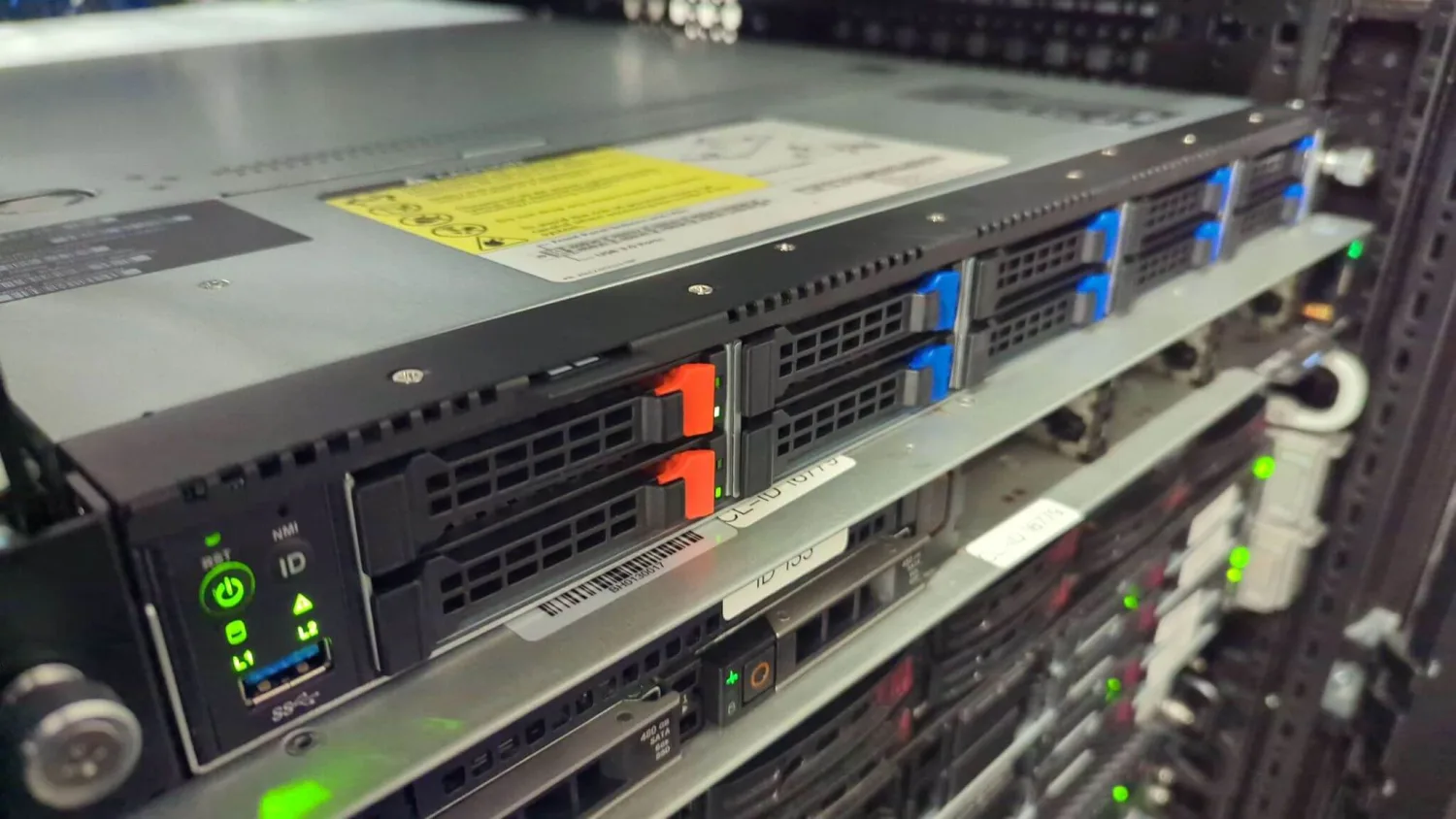
No abstraction, no region code. Racked servers on our own hardware, in a UK facility, with named engineers responsible for the drives your files land on.
Understanding where cloud storage is stored is one thing. Owning part of the cloud is another. Our UK VPS plans let you host your own cloud storage stack (Nextcloud, ownCloud, S3 compatible storage gateways and more) on fast NVMe hardware with full control over where your data lives. UK data residency, NVMe storage and DDoS protection on every plan.
Personal cloud storage tests
From £0.50/mo on annual billing.
Private file sync and backup
From £2.00/mo on annual billing.
Small team cloud drive
From £3.00/mo on annual billing.
Company cloud storage hub
From £8.00/mo on annual billing.
These plans suit self hosted cloud: run Nextcloud or an S3 compatible gateway and know exactly where your data is stored. Your cloud data lives in UK data centres, which suits UK and EU privacy, compliance and latency sensitive workloads. DDoS protection, isolated VPS resources and optional backups help keep your cloud storage safe and available.
Want to know exactly where your cloud storage would be stored and which rack your VPS lives in? Talk to our team and we will walk you through it.
Cloud storage is stored on physical hard drives and SSDs inside data centres, not in some abstract cloud. Your files live on servers in racks, inside secure buildings, connected to the internet via high speed networks. The term cloud describes how those resources are pooled and accessed, not the location itself.
With many consumer cloud providers you can only choose a region, not a specific city or building. With a VPS or cloud server from us, you know your data is stored in UK data centres. For strict compliance, many businesses prefer this over generic global storage where the exact country can change.
In most modern cloud storage systems, your data is replicated across multiple disks and often multiple servers or racks. This means your files are effectively stored in more than one place within the same region so that a single hardware failure does not cause data loss. Some providers also copy data to another region if you enable cross region redundancy.
In a well run data centre, only authorised staff can access server rooms and racks. Entry is controlled by badges, biometrics or keys and monitored by CCTV. When you host cloud storage on our VPS or dedicated servers, physical access is limited to vetted engineers and data centre staff, not random third parties.
Not always. Some providers give region controls, for example Europe or UK, and others decide automatically. Your files might be stored in a different country from where you live, especially if the provider routes traffic to whichever data centre is cheapest or has spare capacity. If data residency matters, using a UK based VPS or cloud server gives you far more certainty about where your cloud storage is stored.
While we do not publish rack diagrams for security reasons, we can confirm the data centre location, region (UK), and infrastructure details your VPS or cloud server runs on. If you self host cloud storage with us, you know your data is stored in UK based facilities on our own hardware, not spread randomly across global regions.
Use our UK based VPS and cloud servers as the foundation for your own cloud storage, so your data stays fast, local and under your control.