Absorb, filter, deliver
Traffic for your service reaches an edge location before it reaches your server. Attack traffic is dropped there. Clean traffic carries on to you, at the same rate it always did.
Scroll the chart sideways to see the full two minutes
Absorbed at the edge 3.1 Tbps Passed to your server 0 Tbps Time to mitigate None, always on Network capacity 30 Tbps
-
01
Absorbed at the edge
Our anycast network announces your address from multiple edge locations, so a flood is spread across the network and soaked up close to its source instead of arriving at one machine in one rack.
-
02
Filtered by protocol
Every packet is inspected against Layer 3, Layer 4 and Layer 7 rules, plus the game-specific filters below. Malformed, spoofed and flood traffic is dropped; genuine player traffic is not.
-
03
Delivered clean
What is left is forwarded to your server. Because the filtering runs constantly rather than switching on when an alarm fires, your players stay connected through the attack instead of reconnecting after it.
We do not null-route customers under attack. Null-routing takes your service offline to protect the network, which is exactly the outcome the attacker wanted. Our approach is to keep filtering and keep you online.
Filtering happens where the attack lands
EdgeProt announces your address from every location on this map. An attack is split across the whole footprint and dropped at the nearest edge rather than being dragged across the world to your rack.

- Core scrubbing site
- Edge location
- Fibre run
Game-specific DDoS filters
Generic scrubbing does not understand a game protocol, so it either lets crafted packets through or drops real players. These filters are written per protocol and are constantly updated to match new exploits and evolving attacks.
-
Minecraft Bedrock
Specialised protection for Minecraft Bedrock Edition servers.
Protects: Minecraft Bedrock -
CSGO filter
Tailored to prevent known CSGO-specific exploits and flooding.
Protects: CSGO, CS 1.6, CS: Source -
RakNet V2
Mitigation for attacks targeting the RakNet V2 protocol.
Protects: Rust, Unturned, Hurtworld, SCP:SL, Scum -
OpenVPN and WireGuard
Keeps tunnels stable under load or attack.
Protects: VPN hosting, proxy servers, private cloud access -
Steam Query
Protects A2S query traffic from floods and spoofing.
Protects: Rust, Ark SA, Ark SE, DayZ, Squad, 7 Days to Die, Scum -
Garry's Mod
Stops Lua exploit floods and other custom protocol attacks.
Protects: Garry's Mod -
SCP: Secret Laboratory
Targeted protection for SCP:SL traffic and RakNet abuse.
Protects: SCP: Secret Laboratory -
Hurtworld
Advanced filtering for Hurtworld's protocol layer.
Protects: Hurtworld -
SteamNet
Filters attacks on Steam networking sockets.
Protects: Rust, Palworld, Squad -
San Andreas
Protocol inspection for SA-MP flooding and exploits.
Protects: GTA SA, SA-MP -
DDNet
Custom protections for the DDRace mod networking stack.
Protects: DDNet -
SYN cookies
Generic TCP SYN flood protection across every title.
Protects: All listed titles and more
Query protection that also grows your server
Server browsers hammer your A2S query port, and attackers know it. Our A2S caching answers those queries from the edge, which blocks query-based attacks and improves how your server looks in Steam and other listings at the same time.
Scroll the diagram sideways to follow the whole path
-
Lower query latency
Global caching reduces query response times, improving server browser performance worldwide.
-
Blocks A2S-based DDoS
Prevents A2S query floods that crash or lag servers, maintaining stability.
-
Better player acquisition
Faster server listing responses increase visibility and attract more players.
-
Higher player averages
Improved query performance feeds through to higher 24h player averages and total counts.
-
Transparent fallback
An automatic fallback handles A2S anomalies without interrupting the service.
Communities switching to our A2S caching see up to 50% more players on average, from a mix of lower global query latency and better discoverability in server listings.
You get the firewall, not just the promise
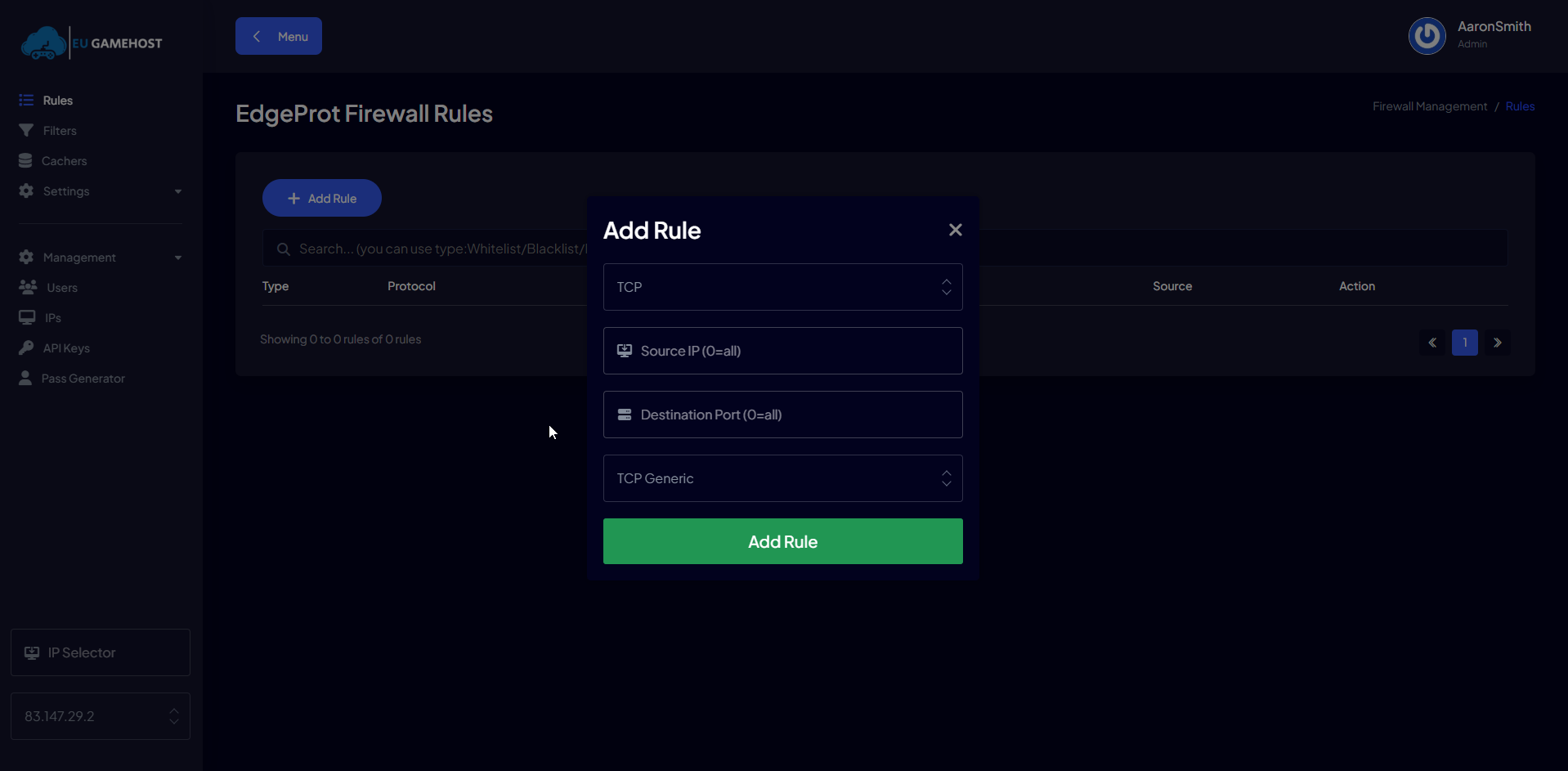
The platform filters everything by default. On top of that you get the EdgeProt rule editor, so you can whitelist, blacklist and shape traffic on your own addresses.
-
Rules per protocol and port
Add TCP or UDP rules against a source address and destination port, with the filter profile that matches the service behind it.
-
Cachers and filters
Turn A2S caching and the protocol filters on per address, so a query cache sits in front of the port that needs it.
-
Whitelists and blacklists
Pin known-good sources through and shut out anything you never want to hear from again, without raising a ticket.
-
IP selector and API keys
Switch between the addresses on your account, and drive the same rules from your own tooling with an API key.
Built for the size of attacks game servers actually get
The filtering backbone is shared across every EUGameHost service, so a small community server sits behind the same capacity as the largest network we host.
EdgeProt
Filtering capacity across the whole footprint
Cosmic Guard
Up to, per protected service
Every layer
Volumetric, transport and application
The numbers, written down
- Filtering capacity
- 30Tbps
- Attack layers covered
- Layer 3, Layer 4 and Layer 7
- Mitigation mode
- Always on, no activation step
- Game server platform
- Cosmic Guard, up to 30Tbps per service
- Anycast filtering backbone
- EdgeProt
- A2S query caching
- Included
- Cost
- Included, no add-on
We mitigate attacks up to 2Tbps daily. Figures above are platform capacity, not a per-customer allowance.
Do not panic. Mitigation is already in place.
There is nothing you need to enable. These are the only steps worth taking while an attack is in progress.
-
Step 1
Leave the service running
Filtering is already applied to your address. Rebooting or moving the service does not help and costs you players.
-
Step 2
Check your panel
Your panel shows the active mitigation notice and the attack detail, so you can see what is being filtered.
-
Step 3
Contact us if it still hurts
If gameplay is still affected, open a ticket or ping us on Discord. We analyse the pattern and apply a custom filter.
-
Step 4
Keep gaming
The mitigation keeps your players online, which is the whole point. You should not have to manage it.
Ask us after onboarding and we will carry out a free DDoS vulnerability audit, so your services run with the best application-specific filters for what you actually host.
 8 Ark clusters, still online
A 700 player Ark network that stopped collapsing
"My Ark cluster was facing devastating DDoS attacks that brought down our entire 700 player network during peak hours. Traditional protection services either caused too much latency or let attacks through.
EUGameHost changed that. The moment we switched, attacks stopped reaching our servers. The A2S caching actually improved our server browser performance, and we saw a 15% increase in player retention.
What impressed us most was the custom filter they deployed for our specific Ark protocol vulnerabilities within 20 minutes of reporting an issue. Now we host 8 Ark clusters with zero downtime."
Ark server network administrator
We also host large Ark clusters including Mesa and INX, alongside major Rust servers and FiveM communities such as Hive and BESTRUST.
Websites, APIs, VPNs and everything else you run
The gaming filters are the specialist part. The rest of the platform protects any internet-facing service you host with us.
Websites and APIs
Layer 7 filtering for HTTP floods and application-layer abuse, on top of the volumetric filtering.
VPN and proxy
OpenVPN and WireGuard filters keep tunnels stable when the tunnel endpoint is the target.
Hosting infrastructure
Protection covers whole ranges, so resellers and hosts can put their own customers behind it.
Protected services: Game servers UK VPS hosting Dedicated servers Web hosting Gaming VPN