Counter-Strike 2 Server Hosting
Counter-Strike 2 server hosting where every millisecond counts.
Launch Your CS2 Server in 60 Seconds
- Instant setup
- Always-on DDoS protection
- Full FTP access
- Steam Workshop
- Configuration Editor
- Backups
Check your connection
Compare latency to our locations


Measured live from your browser
Lower ping means sharper hit registration and a tighter competitive feel.
Pick your CS2 server.
Every plan includes full SFTP & console access, one-click Steam Workshop, always-on DDoS protection and our control panel: scale up or down anytime.
Starter
4 Cores @ 3.6GHz · Unlimited players
Pro
4 Cores @ 3.6GHz · Unlimited players
Ultra
4 Cores @ 3.6GHz · Unlimited players
We're rated excellent.
Rated 4.8 / 5 by 500+ server owners on Trustpilot.





One of the best providers
Changing to EUGameHost was one of the best decisions I've made. I now run a dedicated server and two FiveM servers. The team is amazing, knowledgeable and personal. No bots.
The best out there
I've tried a lot of game server hosts over the years and after a year with EUGameHost they're one of the best, especially the support. Loads of RAM where most hosts charge a fortune to upgrade.
Amazing customer service
Had an issue with my server and got a response very quickly. Once we confirmed it, the fix was applied immediately and I was given extra time for free. 100% recommend.
Rock steady through DDoS attacks
Switched our server over from a previous host after server-killing DDoS attacks. Haven't had a single issue since and the servers are rock steady.
Best host out there
Really good host, very good server and a very patient team, always there to help with quick ticket responses. Extremely happy with their work.
Fantastic price for the hardware
Use this to host a game server: absolutely fantastic price for the hardware available. Had one small issue and got a human response in under 2 minutes. Can't complain.
Built specifically for Counter-Strike 2 servers.
Workshop maps, custom modes, configuration and a live console: everything you need to run a competitive or community CS2 server without fighting the hardware.
Sub-Tick Performance
- High-clock Intel & Ryzen CPUs
- Consistent sub-tick timing under load
- Sharp hit registration at peak action
- Bare-metal nodes, no overselling
Workshop & Maps
- One-click Steam Workshop sync
- Automatic map updates & collections
- Fast downloads on a 10 Gbps network
- Official + custom community maps
Modes & Plugins
- Surf, KZ, retakes & aim training
- Competitive, Casual & Wingman
- Upload custom plugins via SFTP
- No restrictions on game modes
Reliability
- Always-on Layer 3/4/7 DDoS protection
- Game-aware filtering keeps you visible
- UK datacentres, sub-10ms latency
- 24/7 UK-based CS2 support
Trusted by 500+ game server owners.
Full control over your CS2 server.
Manage Workshop content, plugins, configuration and your live console from one powerful panel: switch between the features below to see how easy CS2 server administration really is.
View CS2 plans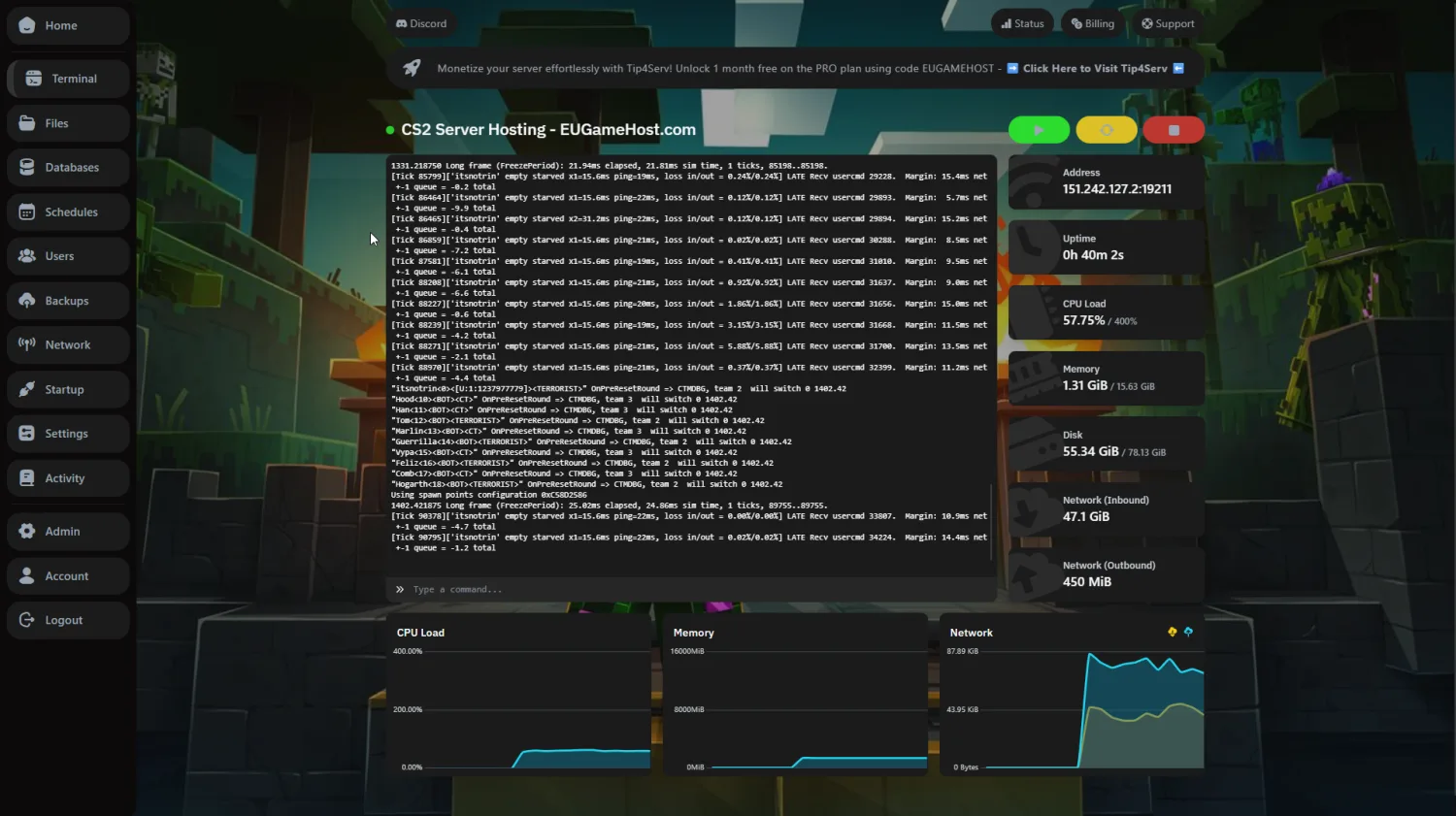 Live server console
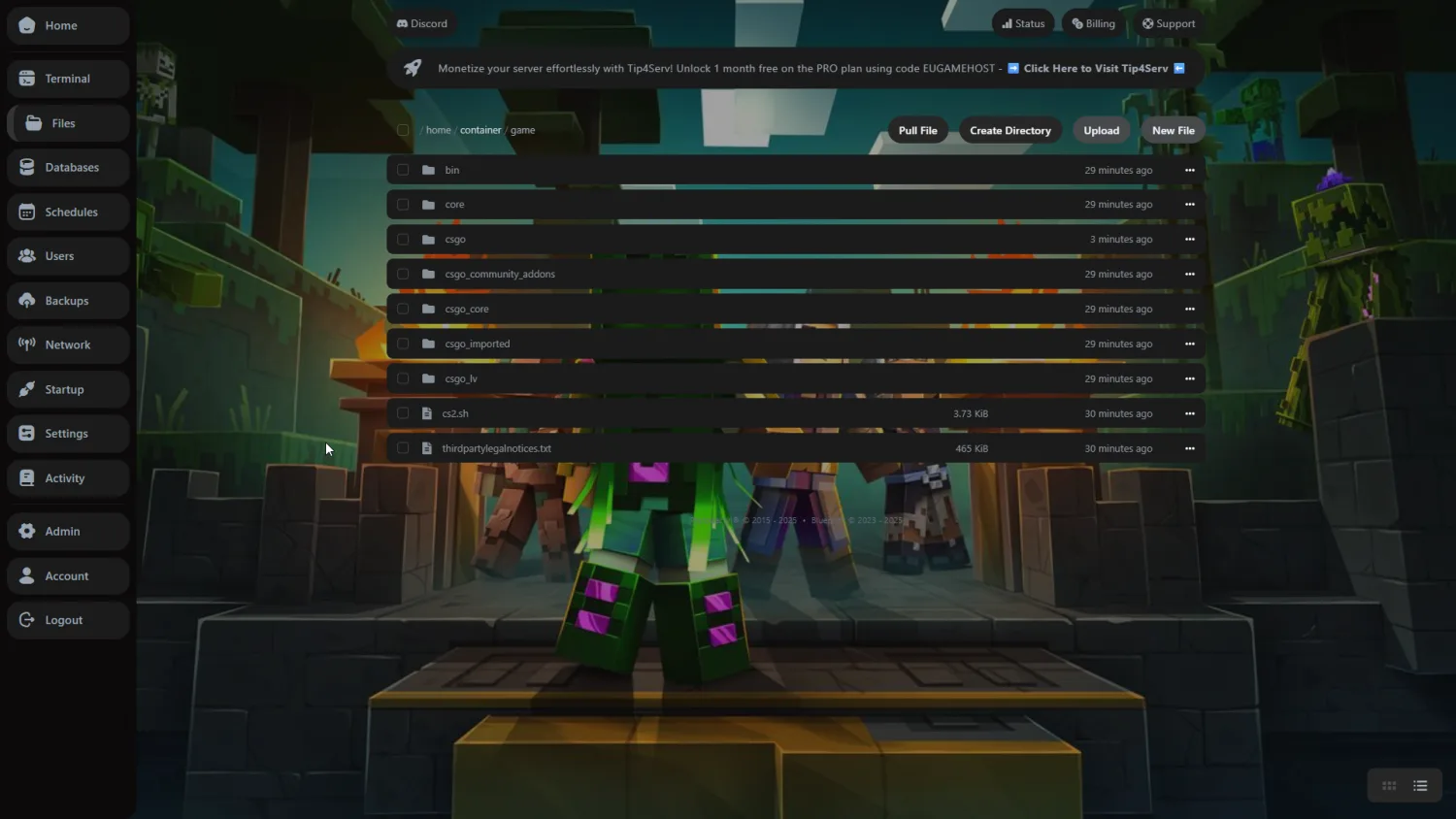 Complete file control
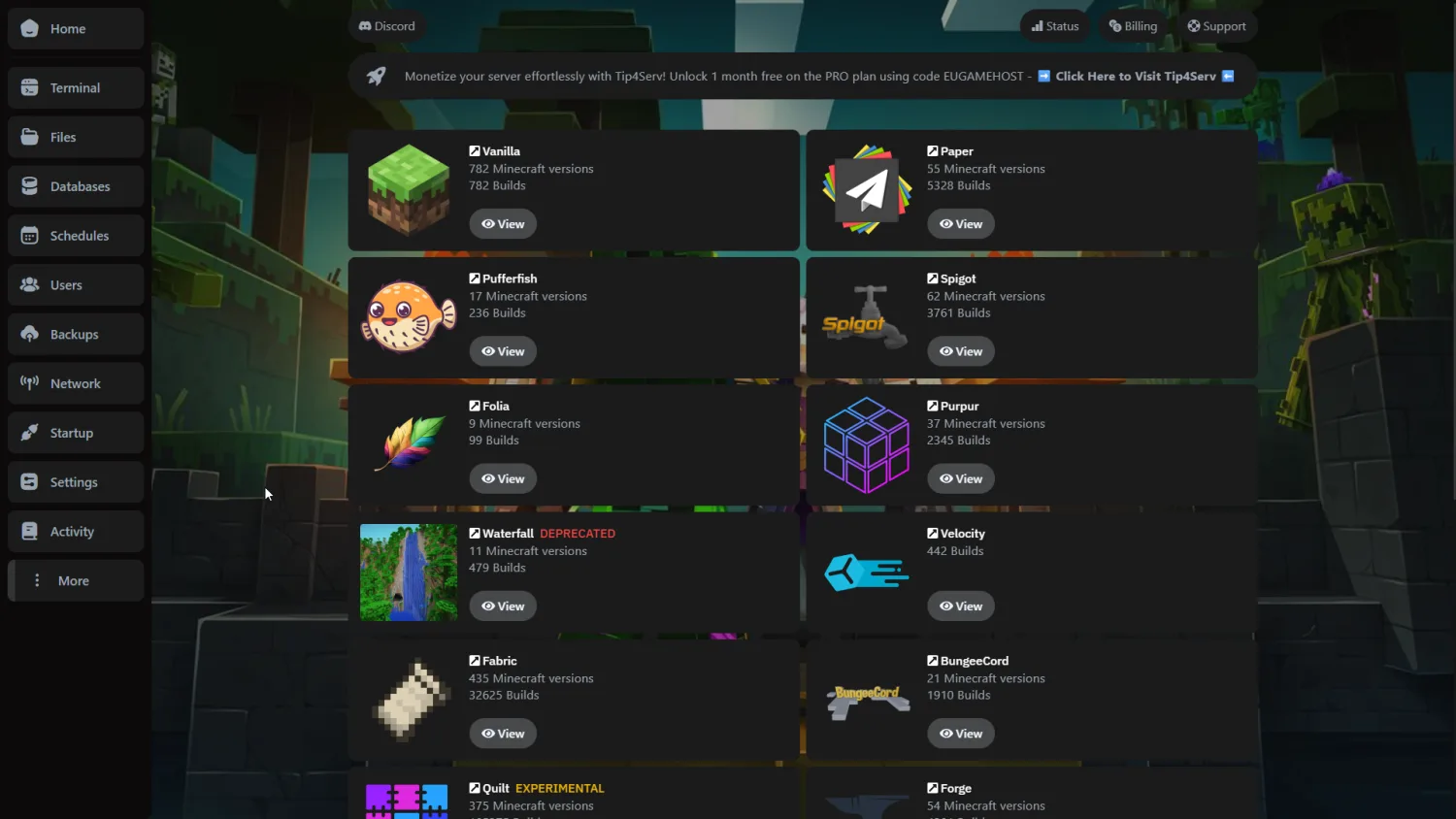 Workshop integration
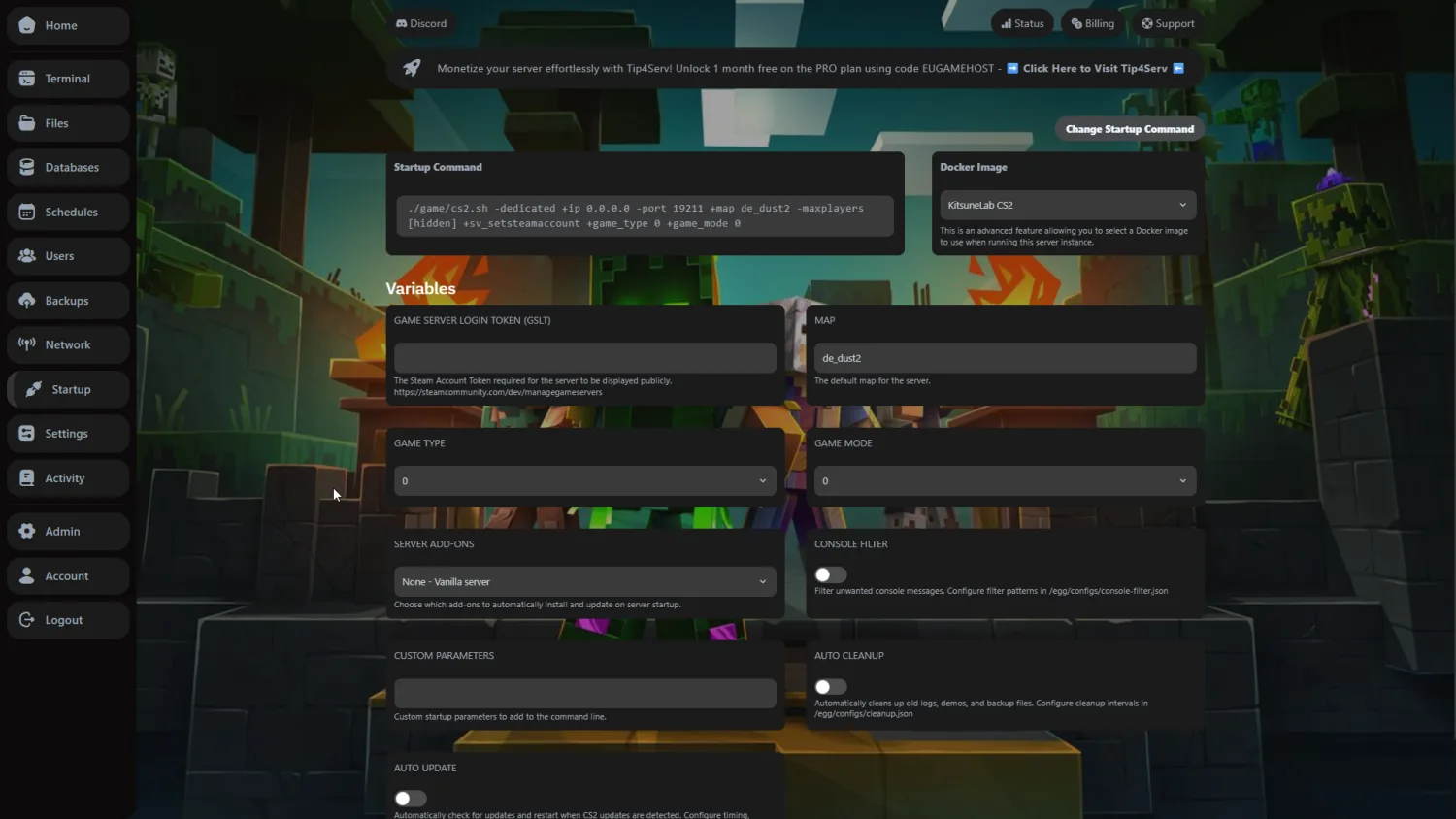 Easy configuration
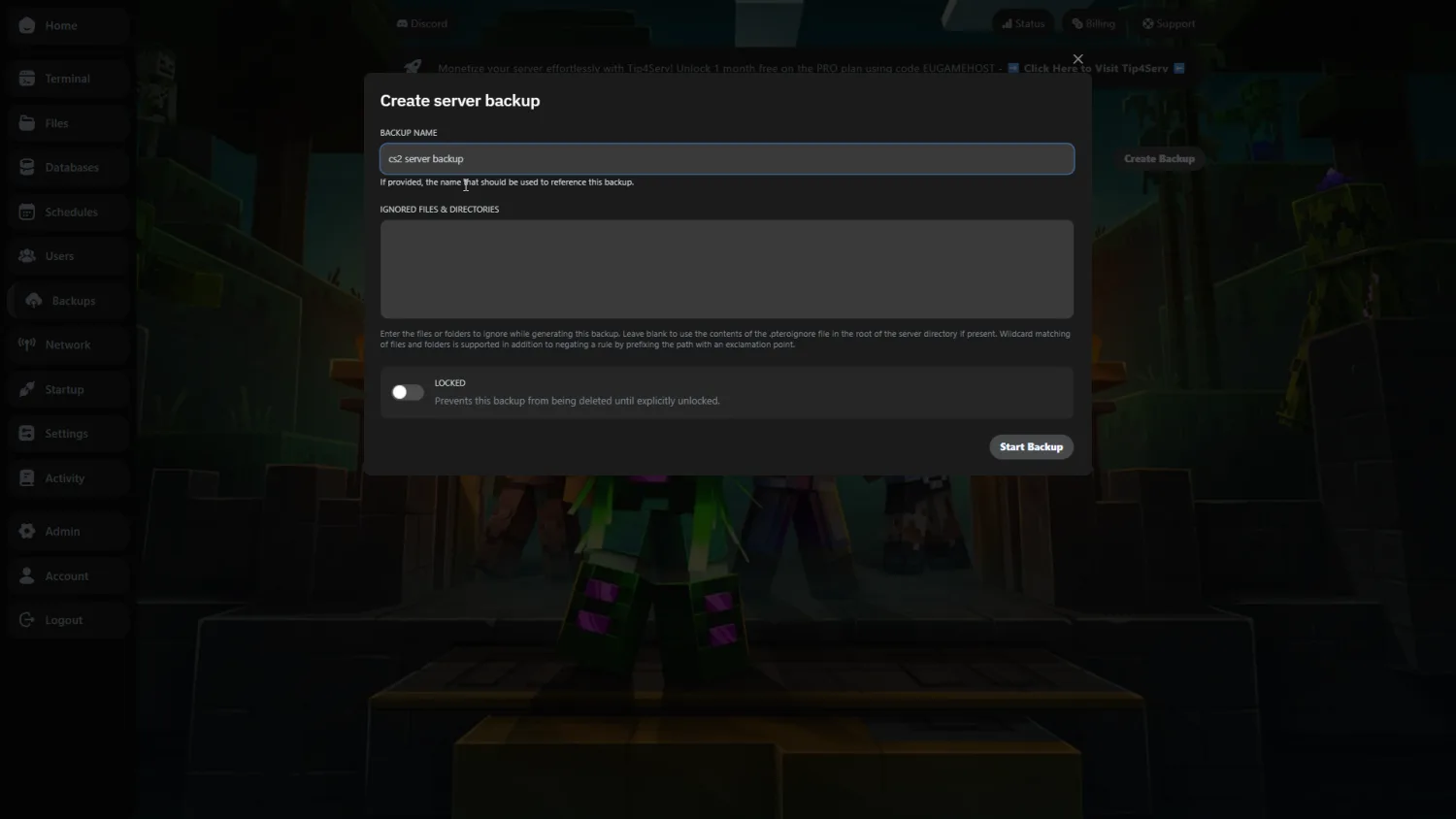 Automated backups
Built for sharp sub-tick performance.
CS2's sub-tick system is CPU-bound: real hardware tied to real in-game results, so hit registration stays crisp when it matters most.
High-Clock CPUs
Single-thread headroom
10Gbps Connection
Low-latency network
NVMe SSD
Read & write
What that means on your CS2 server
EUGameHost vs a typical host
| Hardware | Entry | EUGameHost Best | Typical host |
|---|---|---|---|
| CPU | Intel @ 3.6GHz+ | High-clock Ryzen / Intel · dedicated cores | Low-clock / oversold |
| Memory | DDR4 | DDR5 | Shared DDR4 |
| Storage | NVMe 4.0 SSD | NVMe 4.0 SSD | SATA SSD or shared NAS |
| Network | 10 Gbps | 10 Gbps | 1 Gbps shared |
| DDoS protection | Always-on · Layer 3/4/7 | Always-on · Layer 3/4/7 | Null-routed during attacks |
| Steam Workshop | One-click sync | One-click sync | Manual file management |
| Setup time | ~60 seconds | ~60 seconds | Manual / queued |
Compared with a typical budget CS2 host: specifics vary by provider and plan.
Lower ping. Sharper gunfights.
Our private backbone and smart routing keep your CS2 server responsive for players across the UK, EU, and beyond.

- Point of presence
- Edge metro
- Private fibre run
Everything you need to run a better CS2 server.
CPU-optimised hardware, real DDoS protection and a panel built for CS2 admins, without the premium price tag.
Instant setup
Go from checkout to a live CS2 server in under 60 seconds: your server deploys automatically with full control panel access.
Sub-tick performance
High-clock Ryzen and Intel CPUs, DDR5 memory and pure NVMe SSDs keep sub-tick timing consistent and hit registration sharp under load.
Always-on DDoS protection
Layer 3, 4 and 7 mitigation with Anycast routing keeps your CS2 server online and visible through attacks, never null-routed, nothing to configure.
24/7 CS2 support
Real UK-based people who understand config files, Workshop and plugins: fast answers by ticket or Discord, day or night.
Workshop & custom modes
Sync Steam Workshop in one click, upload unlimited custom plugins via SFTP, and run surf, KZ, retakes and more whenever you like.
Full control panel
Manage server.cfg, the live console, Workshop content, RCON, backups and files from one powerful panel you actually control.
This is Counter-Strike 2.
A look at competitive CS2, then build your own server in under a minute.









Try us risk-free with a 48-hour money-back guarantee.
Spin up your Counter-Strike 2 server and put us to the test. If it's not right within the first 48 hours, contact support for a full refund. No contracts, cancel anytime.
CS2 server hosting questions, answered.
Your CS2 server is deployed automatically the moment your order completes and is typically online within 60 seconds, with full control panel access. There is no manual setup or waiting for approvals, just instant access to a fully configured server you can invite players to straight away.
Counter-Strike 2's sub-tick architecture samples player actions continuously between server frames, so a high single-core clock speed keeps timing consistent and hit registration sharp, even during smoke executes and multi-kill moments. We run high-clock Intel and AMD Ryzen CPUs chosen specifically for that workload, rather than low-frequency oversold cores.
Yes. Every plan includes full SFTP access to all server files, complete live console access for commands and monitoring, and root-level control over your server.cfg and configuration. There are no locked features or restrictions: you control your entire server end to end.
Yes. You can link a Steam Workshop collection and have CS2 download and sync maps automatically, with no manual file management. Our 10 Gbps network keeps Workshop downloads fast so map rotations and large collections never bottleneck on disk or bandwidth.
Yes. With full file-level access you can install plugins and run custom community modes including surf, KZ (climb), retakes, aim training, bhop and more, alongside the official Competitive, Casual, Wingman and Deathmatch modes. There are no restrictions on the plugins or game modes you run.
Yes. Every CS2 server includes always-on DDoS protection with Layer 3, 4 and 7 filtering and Anycast routing, designed specifically for game traffic and UDP floods. Crucially, our game-aware filtering preserves Steam master-server queries so your server stays visible in the browser during an attack, and is never null-routed.
There are no artificial slot caps. Your real capacity depends on your hardware tier and how heavy your mods and game mode are: high-clock CPUs and generous RAM let our plans comfortably run anything from a 10v10 casual server to a 32 to 64-player community server.
CS2 uses UDP 27015 for game traffic, UDP 27016 for the query port (server browser visibility), TCP 27015 for RCON and UDP 27020 for SourceTV/GOTV. Misconfigured query ports are the most common reason a server doesn't appear in the community browser: our panel sets these up for you automatically.
Yes. Plan changes are instant and require zero downtime. Your billing adjusts automatically to the new tier, and all of your server data, configs and settings stay intact through the switch, so you can scale up before a big event and back down afterwards.
All CS2 servers run on high-frequency AMD Ryzen or Intel processors, DDR4/DDR5 RAM, PCIe 4.0 NVMe SSDs and a 10 Gbps network. These are bare-metal nodes, not oversold virtual machines, so your server gets dedicated CPU cycles for consistent sub-tick performance.
We host Counter-Strike 2 in UK datacentres with optimised routing for European players, delivering sub-10ms latency for UK player bases. You can run the live latency test at the top of this page to check your real ping before you buy.
Our UK-based support team is available 24/7 via ticket and live chat, staffed by real people who understand game servers: config files, Workshop, plugins and connectivity. Most queries are resolved within minutes, with no automated replies or offshore call centres.
Free and ultra-cheap CS2 hosting almost always runs on low-frequency, oversold CPUs that cause inconsistent sub-tick timing and laggy hit registration the moment a server fills up. Our CS2 hosting starts at £8.99/mo: fair value for high-clock CPUs, NVMe storage, a 10 Gbps network and real always-on DDoS protection that keeps a competitive server sharp.
What to look for in a CS2 host
Not every CS2 host is built the same: here is what genuinely matters when choosing where to run your Counter-Strike 2 server, and how EUGameHost delivers on each.
| What to look for | Why it matters for CS2 | EUGameHost |
|---|---|---|
| High single-core CPU speed | CS2's sub-tick system samples player actions continuously between frames, so per-core clock speed dictates how consistently hits register, especially during smoke executes and multi-kills. | We run high-clock Intel and AMD Ryzen CPUs chosen for single-thread performance, on bare-metal nodes so your server isn't fighting noisy neighbours for cycles. |
| No overselling | Oversold nodes share one CPU across far too many servers, causing the stutter and inconsistent sub-tick timing that ruins competitive play. | We size capacity to the hardware and never oversell: your plan gets dedicated compute, eliminating the noisy-neighbour problem. |
| NVMe storage | Workshop collections and map rotations can be large, and slow disks cause long startup times and stuttery Workshop downloads. | Every plan runs on PCIe 4.0 NVMe SSD storage as standard for fast map loads, quick Workshop downloads and rapid backup restores. |
| Game-aware DDoS protection | CS2 servers are frequent attack targets, and generic web filtering often blocks Steam queries, taking your server out of the browser, or null-routing it entirely. | Always-on Layer 3/4/7 DDoS protection with Anycast routing is included on every server, and our game-aware filtering keeps you visible during an attack. |
| Steam Workshop integration | Manual map management is tedious and error-prone, and a slow network bottlenecks Workshop content for joining players. | One-click Workshop collection sync plus a 10 Gbps network keep maps updating automatically and downloads fast. |
| Custom modes & plugins | Some hosts lock you out of custom plugins, which kills surf, KZ, retakes and other community modes before you start. | Full file-level SFTP access means you can run any plugin and any game mode, official or community, with no restrictions. |
| UK locations (latency) | Low ping keeps peeking, shooting and movement responsive; the right location for your players makes a tangible difference in a precision shooter. | Choose UK datacentres to put your server close to European players with sub-10ms latency, and test your real ping before you buy. |
| Unlimited slots | Many hosts artificially cap player counts to oversell nodes, trapping a growing community on a low limit. | No artificial slot caps: your real capacity is set by your hardware tier, so you can run anything from a 10v10 to a 64-player community server. |
| Real 24/7 support | CS2 problems don't keep office hours: a broken config or invisible server at 2am needs a real person who knows the platform. | Genuine 24/7 UK-based support that understands config files and Workshop, backed by a 4.8/5 Trustpilot rating from over 500 reviews. |
| No-contract / cancel anytime | Community interest ebbs and flows, so being locked into a long contract is a needless risk. | No contracts, ever: pay as you go, scale up before a tournament and cancel whenever you choose. |
The complete guide to CS2 server hosting
Renting a Counter-Strike 2 server gives you full control over your own competitive or community server (game modes, Workshop maps, plugins and configuration) without running demanding hardware at home. This guide covers everything you need to know about CS2 server hosting: how sub-tick works, the hardware CS2 demands, the ports and connectivity that matter, what it costs and how to pick a host that keeps hit registration sharp when the server fills up.
Counter-Strike 2 server hosting is a service that runs a dedicated CS2 server instance on managed hardware, so players can connect to a persistent server with your chosen game mode, maps, plugins and rules around the clock. Rather than running a listen server from your own PC, a hosted server stays online, stays visible in the community browser, and delivers the consistent performance competitive play demands.
EUGameHost provides premium UK CS2 hosting with a full control panel, live web console, file manager, configuration editor, automatic backups and one-click Steam Workshop integration, so you can go from checkout to a live, Workshop-ready server in minutes. With a Trustpilot rating of 4.8 out of 5 from more than 500 reviews, it's a setup built for community owners who want their server to feel as sharp as the game itself.
Counter-Strike 2 server performance depends heavily on CPU single-core frequency, RAM speed and storage type. Unlike many games, CS2's sub-tick system demands consistent high-frequency processing rather than raw core count, so a strong single-thread CPU is the single most important component.
Storage matters more than people expect, too: NVMe SSDs cut map load times dramatically compared with SATA SSDs, which affects Workshop content downloads, server startup and backup restoration. PCIe 4.0 drives roughly double the throughput of PCIe 3.0, making them ideal for servers with frequent map rotations.
CPU: single-core speed wins
Because CS2's sub-tick calculations occur continuously between server frames, clock speed and per-core throughput are the biggest factor in performance. A high-frequency CPU (5+ GHz) processes these micro-events faster, maintaining consistent timing even under load. EUGameHost runs high-clock Intel and AMD Ryzen processors on bare-metal nodes chosen specifically for this workload.
RAM by player count
A rough guide: 8 GB is adequate for small casual servers (10 to 20 players); 16 GB is recommended for 32 to 64 players to handle Workshop downloads and plugin overhead; and 32 GB suits complex mod setups and large player counts. Our Starter plan ships with 16 GB, Pro with 24 GB and Ultra with 32 GB.
Counter-Strike 2 introduced Valve's sub-tick architecture, fundamentally changing how server performance affects gameplay. Traditional CS:GO servers ran at fixed tickrates (64 or 128 ticks per second); CS2's sub-tick system instead samples player actions between ticks, registering events with microsecond precision. The result is fairer peeker's advantage and more accurate hit registration, but only if the server has the processing headroom to keep up.
That headroom is exactly what a high-clock CPU on a bare-metal node provides. Budget CPUs with lower clock speeds struggle during peak action (smoke executes, multi-kill situations) causing subtle delays in hit registration. While CS2 no longer advertises “128 tick”, sub-tick servers on fast hardware effectively deliver equivalent or superior responsiveness to CS:GO's 128-tick servers.
CS2 servers require specific ports for game traffic, server queries and RCON access, and misconfigured ports are the most common reason a server doesn't appear in the community browser. The defaults are UDP 27015 for game traffic, UDP 27016 for the query port (server browser visibility), TCP 27015 for RCON, and UDP 27020 for SourceTV/GOTV.
Poorly configured DDoS protection can also block legitimate Steam master-server queries, making your server invisible even when it's running fine. Game-specific filtering with Anycast routing and Layer 7 inspection preserves visibility while blocking attack traffic: which is exactly how EUGameHost's protection is designed, so your server stays in the browser during an attack.
CS2 supports the official Competitive (5v5 MR12), Casual (10v10), Wingman (2v2) and Deathmatch modes out of the box, plus extensive community modding for surf, KZ (climb), retakes, aim training, bhop and more. With full file-level access on EUGameHost you can install the plugins these modes need without restriction.
Steam Workshop integration lets your server download and sync maps automatically, no manual file management. Set a Workshop collection with host_workshop_collection and load maps directly with workshop_start_map, and our 10 Gbps network keeps downloads fast so large collections and frequent map rotations never bottleneck.
CS2 server hosting is priced mainly on the hardware tier you choose and the headroom you need for player count and mods. A small casual server costs very little to run, while a busy, plugin-heavy community server needs more single-thread horsepower and RAM, and the pricing reflects that.
EUGameHost's CS2 plans start from £8.99 per month for Starter (16 GB RAM), with Pro at £16.99 per month (24 GB RAM) and Ultra at £29.99 per month (32 GB RAM). Choose annual billing to save 20%. There are no contracts and you can cancel anytime, so you're free to scale up before a tournament and adjust afterwards without penalty.
Location is the difference between responsive gunfights and a server that feels laggy for half your players. CS2 is extremely sensitive to latency (peeking, shooting and movement all come down to fractions of a second), so you want your server hosted as close as possible to the bulk of your player base to keep ping low and sub-tick timing tight.
EUGameHost hosts CS2 in UK datacentres with routing optimised for European players, delivering sub-10ms latency for UK player bases. Run the live latency test at the top of this page to check your real ping before you buy, and where your community spans regions, host close to the majority so nobody is stuck at a high-ping disadvantage.