The short answer
Add an A record pointing your subdomain at the server IP, with the
Cloudflare proxy set to DNS Only (grey cloud). If your server runs on a
port other than 25565, add an SRV record named
_minecraft._tcp.play with priority 0, weight 0, your port, and your subdomain
as the target.
Key points
- Dedicated IP on the default port: an A record is all you need.
- Shared IP or a custom port: A record plus an SRV record.
- The Cloudflare proxy must be off. Minecraft is not HTTP traffic.
- The A record takes the IP only, never the port.
- Bedrock does not read SRV records. It needs the port entered separately.
Which setup do you have
Everything below branches on a single question: does your server have its own IP address, or does it share one with other servers on a distinct port?
- Dedicated IP
- Your server has an IP to itself and can run on Minecraft's default port, 25565. One A record and you are done.
- Shared IP
- Your server shares an IP and is distinguished by its port, for example 28017. You need an A record and an SRV record, because the domain alone cannot carry a port.
If you are not sure, look at the connection address in your control panel. If it ends in
:25565 or has no port at all, you are in the first case. Any other number and
you are in the second.
Dedicated IP: an A record
-
Log in to the Cloudflare dashboard
Sign in to your Cloudflare account and select the domain you want to use.
-
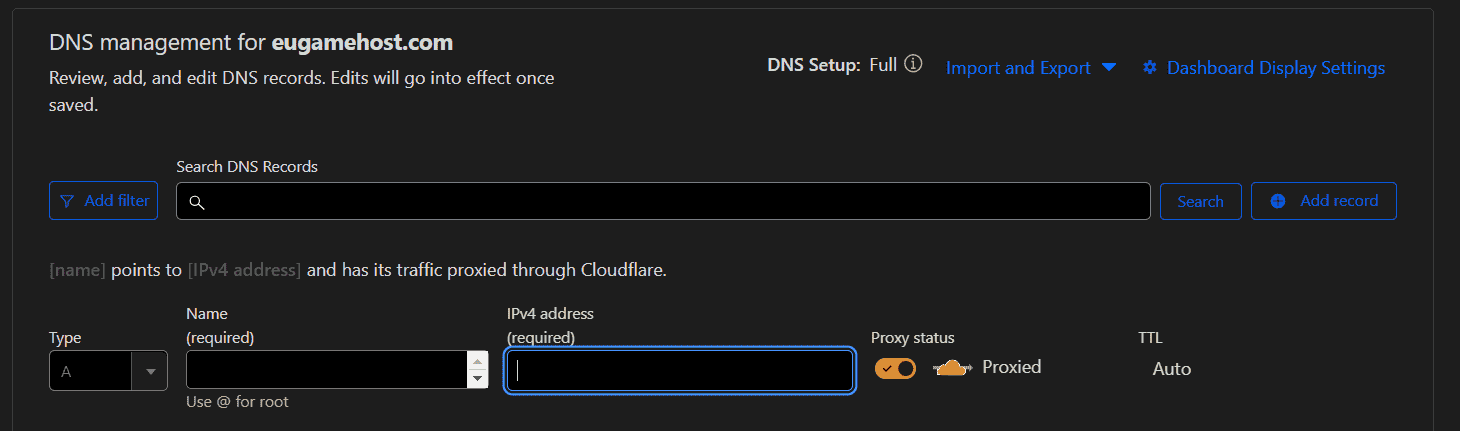
Add an A record
Create a new DNS record of type A with these values:
- Name: the subdomain. Use
playto getplay.yourdomain.com. - IPv4 address: your server's IP address, with no port number.
- Proxy status: turn this off. The cloud must be grey and read DNS Only.
- TTL: Auto.
- Name: the subdomain. Use
-
Save
That is the whole job. Players can now enter
play.yourdomain.cominto the Minecraft client and connect.
Shared IP: A record plus SRV
On a shared IP the port is what identifies your server, and a domain name has nowhere to put a port. The SRV record is how DNS solves that: it carries the port separately, and the Minecraft client knows to go looking for one.
-
Create the A record first
Exactly as above: type A, name
play, your server IP with no port, proxy set to DNS Only, TTL Auto. The SRV record needs something to point at, and this is it. -
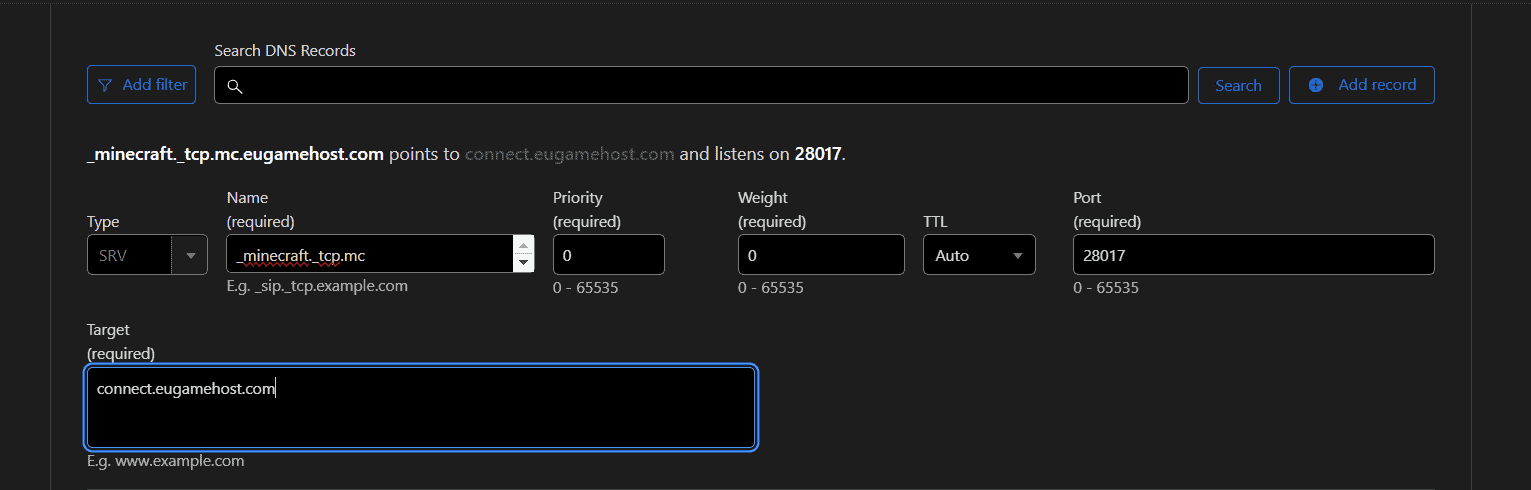
Create the SRV record
Add a second record, this time of type SRV:
- Name: the service and protocol followed by your subdomain, for example
_minecraft._tcp.play. - Priority:
0 - Weight:
0 - TTL: Auto
- Port: your Minecraft server's port, for example
28017. - Target: your domain, for example
play.yourdomain.com.
- Name: the service and protocol followed by your subdomain, for example
-
Save both records
Players can now connect with just
play.yourdomain.com, and the client finds the port on its own.
What the SRV record actually does
An A record answers "what IP is this name". An SRV record answers a more specific question: "for this service, on this protocol, at this name, what host and port should I use".
That is why the name looks strange. _minecraft._tcp.play breaks down as:
_minecraft- The service. Minecraft's client looks for exactly this.
_tcp- The protocol. Minecraft Java uses TCP.
play- Your subdomain, the part players actually type.
Both underscores are required. They are not decoration and they are not optional, and leaving one out is the most common reason an otherwise correct SRV record does nothing at all.
Why the proxy must be off
Cloudflare's orange cloud proxies traffic through their network, which is genuinely useful for websites. It handles HTTP and HTTPS.
Minecraft is neither. It is its own protocol over TCP, so a proxied record hands your players' connections to a system that does not know what to do with them. The symptom is a domain that resolves but never connects, which reads like a server problem and is not one.
Set the proxy status to DNS Only so the cloud icon is grey, not orange. If you already have a working website on the same domain, leave those records proxied and change only the Minecraft subdomain. The setting is per record, not per domain.
The Bedrock caveat
Everything above about SRV records applies to Minecraft Java Edition. Bedrock does
not read SRV records the same way, so a Bedrock player pointed at
play.yourdomain.com will not be sent to your custom port.
Two ways round it:
- Have Bedrock players enter the port in the port field when they add the server, with the domain in the address field. The A record still does its job, the SRV record just is not consulted.
- Get a dedicated IP for the server so it can run on the default port, and no port needs specifying at all.
Checking it worked
DNS changes with a TTL of Auto usually take effect within a few minutes, but propagation is not instant everywhere at once. Before you conclude something is wrong:
- Try the domain from a device on a different network, such as a phone off wifi. If it works there and not at home, that is local DNS caching, not your record.
- Confirm the A record has an IP and only an IP. Pasting the full connection string with the port into an A record is a common slip and it silently fails.
- Recheck the proxy status. It is easy to create the record correctly and have Cloudflare default the proxy back on.
- For SRV, recheck both underscores and that the target is the domain, not the IP.
If the domain resolves to the right IP but the connection times out, the problem has moved from DNS to the server itself, and the place to look next is whether the server is running and reachable on the port you specified.